Company knowledge base for AI assistants: one doc, not a prompt
Your discount rules live in a prompt, a wiki, and a pinned message, and they disagree. One document that your assistants and your apps both read.
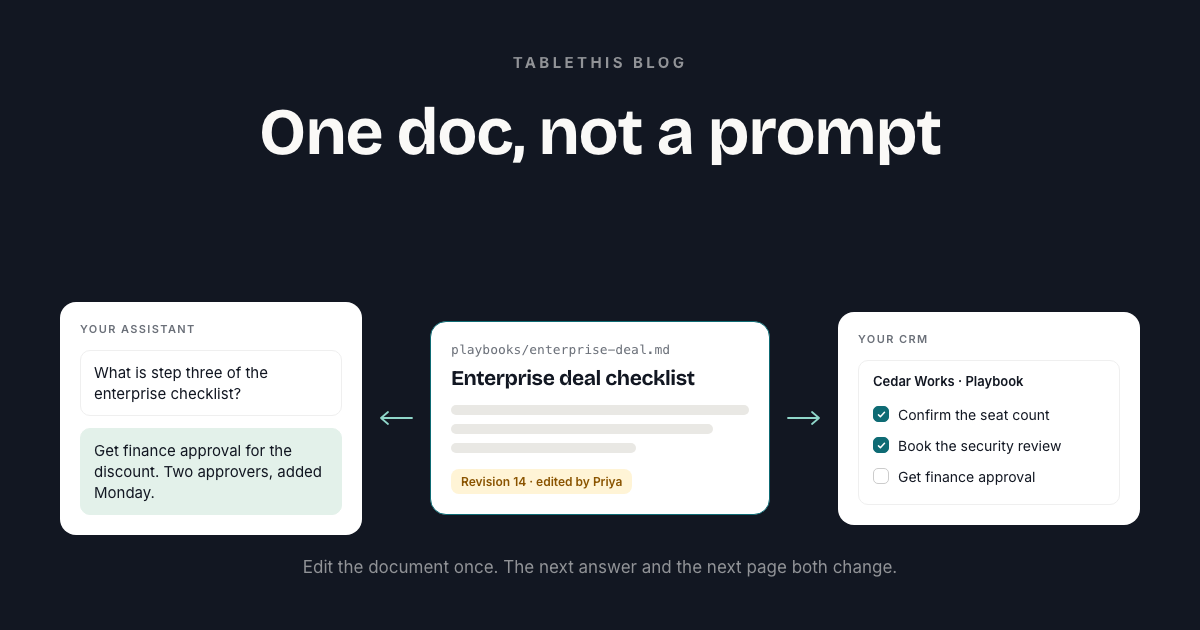
Your company knowledge lives in a dozen places. The discount rules are on a wiki page. The escalation path is in a pinned chat message. The qualification checklist for enterprise deals is three bullets in a prompt, and step three says to get finance approval.
Nobody agrees on which copy is current. Your assistant answers from whichever one it saw last. The CRM you built with it shows whichever one was baked in the day you built it.
A shared knowledge base fixes this by giving two kinds of reader the same source: your AI assistants, and the internal apps and artifacts you build with them.
A prompt is where you asked for the app, not where the process lives
Keeping a policy in a prompt causes three problems, and all three appear slowly.
Every change means a rebuild. The prompt holds the only copy, so changing step three means asking for the app again and hoping nothing else moves. In practice nobody rebuilds, and the app drifts away from the process the company follows.
Nobody can read the source of truth. A new hire asks what step three says. The honest answer is whatever the assistant tells them, which is whatever someone typed into a chat in August. There is no document to link to and no version to check.
A stale step and a wrong step look identical. When the assistant repeats the August version in October, it sounds equally confident either way.
One change fixes all three. Move the process out of the prompt and into a document, then let every reader work from that document.
One document, two readers
TableThis is a shared workspace for typed tables and Markdown documents. A workspace holds two kinds of thing. Tables hold working records: accounts, deals, tasks. Markdown documents hold the knowledge that lives in prose: the qualification checklist, the escalation path, the discount rules.
An assistant connected to the workspace reads the current text of a document, so it answers from what the document says today. The CRM renders the same document, so it shows the current checklist instead of a copy from build day. When someone edits the doc, the next question and the next page both get the new answer. Nothing is rebuilt.
You also gain something a prompt never gives you: a document with a name, an address, and a history.
Documents and tables: which goes where
Records belong in tables, and moving them into a doc is the mistake that runs the other way. A deal needs a typed stage, an owner who is a real person, and a history on the row itself. Put that in a bullet list and you lose all three. You cannot filter it or count it, and two people editing the same line will overwrite each other.
The rule of thumb is short. If a person reads it start to finish, it is a document. If you want to sort it, filter it, or count it, it is a table.
A CRM needs both. The checklist is a document. The deals it refers to are rows in a table. Both live in the same workspace, both are readable by the app and editable by the team, and one permission screen covers both.
Moving a process out of a prompt
Four steps, in this order.
- Write the current process down. The one people actually follow, rather than the ideal one. Put it in a Markdown document with an address like
playbooks/enterprise-deal.md. - Put it in the workspace the app already uses. One document, sitting beside the records it refers to.
- Point the app at the document. Ask your assistant to read the document by its address and render it, and to stop hardcoding the steps.
- Tell the team where it lives. The whole point is that a person can edit it. If only the assistant knows the address, you have swapped one invisible source for another.
Keep the prompt. It is still how you asked for the app, and the parts that describe how the app behaves belong there. What moves out is the material that changes without the app changing.
Why the address matters
Every document has an id, which is a number. Numbers are fine for a machine and useless for a person writing instructions. So a document can also carry a key: an address you choose, like policies/discounts.md. “Read policies/discounts.md and show it” is a line you can put in a prompt and still understand six months later. “Read document 41” is not.
A document keeps its identity when you rename or move it, so a link never breaks when someone tidies the folders.
What happens when people edit it
Every save is a revision with a name on it. The history shows each one with its author and time. You can see that the assistant tightened the discount paragraph on Tuesday, then open the Monday version if you disagree. Restoring an older version creates a new revision credited to whoever restored it, so the trail grows and is never rewritten.
Read and write are separate permissions. An app that only displays your shipping policy can be given read access and nothing else. It cannot change a word. That is the right default for almost every app that shows a process.
How the documents behave under the hood
How big can a document be, and how is it updated?
A document holds up to 1 MiB of Markdown, which is a very long playbook. An update sends the whole new text along with the version it read and a reason, so you can see exactly what would land. There is no line-by-line patching to reason about.
What does a search return?
Passages, never answers. An assistant searching your documents gets back the matching passage with the document title, its folder, the heading it sits under, the version it was found in, and a handle for reading the text around it. It does not get a summary the assistant wrote itself. The app shows the real text and a person can check it.
Does search work by meaning or by keyword?
Both. Search matches by meaning as well as by exact words. If a deployment runs without the meaning-based part, keyword search still works, and the response says the meaning-based part did not run. If nothing matched, it says so rather than returning an empty list for the app to interpret.
How current is the search index?
Documents are split by their headings, so a passage tends to be a section you recognise rather than half a sentence either side of a cut. Indexing runs after a save finishes, never during it, so a save never waits on the index. A document’s indexed chunks are replaced in one step, so the current version is never left half indexed. A document that keeps failing to index stops after five attempts instead of retrying forever.
Can an assistant read a passage from an older version?
Yes, for the version it found the passage in. Reading the surrounding text returns it as it was at that version, even if someone has edited the document since. If that version has been replaced and re-indexed, the read comes back empty and the app searches again, which is a failure it can see rather than a quietly wrong quote.
Questions people ask
Does the app need to be rebuilt when the document changes?
No. The assistant and the app both read the document when they need it, so an edit shows up in the next answer and the next page load.
Can the assistant edit the document, or only read it?
Either. Read and write are separate permissions you approve when you connect. Most apps that display a process only need read.
What if the assistant overwrites a change someone just made?
It cannot. When an assistant updates a document, it states the version it read. If a person saved a change in between, the older write is refused instead of overwriting the newer text. Two people and one assistant can edit the same policy in the same afternoon without the last writer silently winning.
Where to go next
- How to give your team’s Claude artifacts a shared database covers the records half of the same workspace.
- AI agent permissions for internal tools: roles, approvals, and undo covers who is allowed to edit what, and how to undo it.
- The document tools an assistant can call and the permissions it asks for are in the docs.