Airtable alternative for internal tools you build with Claude
Many teams move an AI-built tracker into Airtable. Where it fits, where it stops, and when a shared database built for assistants is the better home.
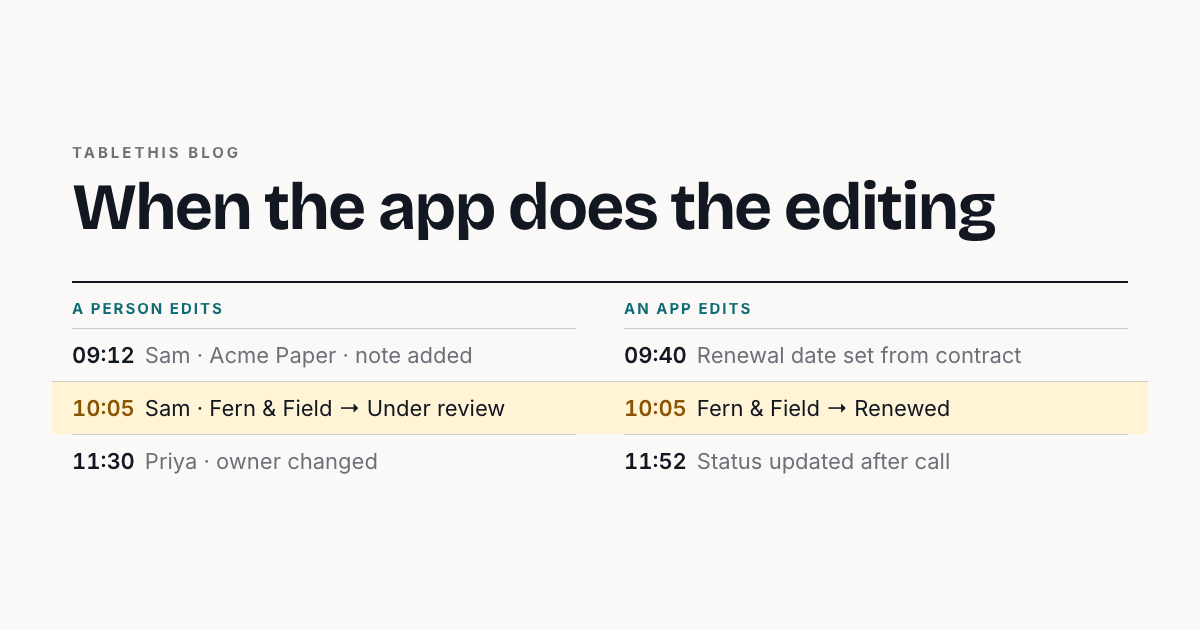
Dana runs operations at Northwind. In March she asked Claude for a vendor tracker, and it built one in an afternoon: a list of suppliers, a renewal date on each, a status, and an owner. Her team liked it, so she moved the records into Airtable, connected Claude through Airtable’s MCP server, and the tracker became a shared tool.
By summer, people still opened the tracker, but most of the writes came from Claude: renewal dates pulled from contracts, statuses updated after calls, notes summarised from email.
When Claude and Sam both changed the same vendor, whose change stuck? Could the finance table be limited to the two people who own it? And could Claude suggest a status change for someone to approve, rather than making it?
What Airtable gives you
- Many ways to look at the same records. Grid, kanban, calendar, gallery, and form views over one table, each with its own filters and sorting. Airtable’s guide to views covers them.
- Rich field types. Numbers, currency, formulas, linked records between tables, attachments, and more.
- Automations and interfaces. Run actions when a record changes, and build simple screens over a base without code.
- An MCP server. Airtable’s MCP server is available on all plans. An assistant connects with OAuth or a personal access token and can search records, create and update them, and create bases.
- Revision history. Every plan includes record-level revision history, showing edits by users, automations by name, syncs, and API calls. How far back it goes depends on the plan: two weeks on Free and one year on Team.
The Free plan allows 1,000 records per base and five collaborators with editor access or above.
Where it stops for an AI-built app
The questions change when an app, not a person, makes most of the edits. An assistant writes faster than people, writes at odd hours, and writes from what it read a minute ago, which may no longer be true.
What happens when the app and a person edit the same row?
In Airtable, the later write sets the value. Airtable’s update record API takes the fields to set, with no parameter for the value the caller expects to replace. If Claude read a vendor as Active, Sam then changed it to Under review, and Claude wrote Renewed, Claude’s write is accepted and Sam’s change is gone.
In TableThis, a cell write names the value it expects to replace, and a whole-record update names the version it read. The write is refused as a conflict if that value or version no longer matches. Claude’s status change expects Active and finds Under review, so it is refused. Claude can tell the person what happened instead of overwriting Sam’s change. Edits to other fields can still succeed when they check only their own cell values.
Can you restrict one table to named people?
Airtable lets owners restrict who can edit specific fields, and who can create or delete records in a table, on Team, Business, and Enterprise Scale plans. That is finer than TableThis in one way: it works per field.
TableThis works per table, per document, and per folder. An owner sets an editor list, and only those people, and the assistants they connect, can write there. Folders pass the list down to everything inside. TableThis has no per-field permissions.
Can an assistant propose instead of write?
Airtable’s help pages do not describe a built-in pending state for a change. Its guides describe review flows built from a status field and an interface, where a person marks a record approved.
In TableThis, a proposal is part of how writes work. When you connect an assistant, you choose its permissions on a consent screen, and one choice is “suggest record changes for you to approve”. An assistant with that permission cannot change a record directly. Its change waits, with its reason, until a person approves or rejects it, and approving and applying are separate steps. A scheduled assistant, such as a nightly job, can never be given permission to write directly at all.
Does the history say an assistant changed it?
Airtable’s revision history names the user, the automation, the sync, or the API call behind each edit.
TableThis records every write with the record, the field, the value before and after, and the actor. A change made through an assistant is marked as an assistant change and listed under the person it acted for, with the reason the assistant gave for making it. The same history is readable by people in the web app and by assistants through the connector.
What a database built for assistants is designed around
TableThis holds typed tables and Markdown documents that apps read and write through an MCP connector. Each write is recorded in the history.
Fields refuse bad values. A status field accepts only the values you list, so “Renewed”, “renewed”, and “Renewal done” cannot become three statuses. A user field accepts only members of the workspace.
The app can ask what changed. Instead of re-reading the whole table, an app asks for the records that changed since its last check.
Undo checks before it runs. An undo is a new change that names the value it expects to reverse. If the cell no longer holds that value, the undo is refused and leaves the current value alone.
Permissions belong to the connection. Each assistant gets its own consent screen, so Claude can edit right away while a reporting tool only reads. No assistant can do more than the person who connected it.
Side by side
| Airtable | TableThis | |
|---|---|---|
| Views | Grid, kanban, calendar, gallery, form | One grid per table in the web app; your app is the view |
| Automations and interfaces | Yes | No |
| Field types | Many, including numbers, formulas, and linked records | Six: short text, long text, date, checkbox, status, user |
| A write’s expected value or version no longer matches | The update API has no expected-value parameter | Refused as a conflict |
| Restrict editing | Per field, and record create and delete per table, on Team and above | Editor list per table, document, or folder |
| Assistant proposes, a person approves | Built with a status field and an interface | A permission you grant when connecting |
| Free plan | 1,000 records per base, 5 editors | 100 MB, no card |
When to stay on Airtable
Stay if people are the main writers and they work in the base itself. Stay if you rely on kanban or calendar views, forms, automations, or interfaces, or if your data needs numbers, formulas, or linked records. TableThis has none of those, and adding an app on top to replace them is work you do not need.
Consider TableThis when the app you built with Claude or Codex is the interface, and the questions you are asking are about the writes: who made this change, what stops an assistant from overwriting a person, and who has to approve it.
Questions people ask
Can I move an Airtable base to TableThis?
There is no importer for Airtable bases and no CSV upload. The practical route is an assistant connected to both: it reads the records from Airtable, creates a TableThis table with matching field types, and writes the records across. Fields with no TableThis equivalent, such as formulas or linked records, need a decision first.
Does TableThis have views and automations?
No. The web app shows each table as one grid, and there are no automations, forms, or interfaces. The app you build with Claude or Codex is the view.
Is TableThis free?
Yes, to start. A new account gets a free workspace with 100 MB of storage and no card.
Where to go next
- How to give your team’s Claude artifacts a shared database walks through connecting an app to a table.
- AI agent permissions for internal tools: roles, approvals, and undo covers the controls in more depth.
- The connector setup guide has the connect steps for Claude, ChatGPT, and other clients.